
How to schedule instagram posts: A Quick Guide to Consistent Content
If your days feel like a constant scramble to get the next Instagram post live, you're not alone. The hidden cost of manual posting isn't just lost time; it's lost momentum, inconsistent messaging, and missed opportunities to actually grow. Learning how to schedule Instagram posts is what separates a reactive chore from a proactive engine for your brand.
Why Manual Posting Is Costing You More Than Just Time
Let's be honest, manual posting often feels like you're stuck on a hamster wheel. You wake up, realize you need to post something, scramble to find a photo, write a caption on the fly, and hit publish just to stay visible. Sound familiar?
This reactive approach creates a chaotic cycle. Strategy gets thrown out the window in favor of just getting something—anything—live. Over time, the quality of your content inevitably suffers. The last-minute rush prevents you from thinking bigger, like planning a cohesive campaign that tells a story over several days. Instead, you're just focused on filling today's empty slot, which leads to a disjointed feed and a confused audience.
The True Cost of Inconsistency
Consistency is the currency of the Instagram algorithm. When you post at random times on random days, you send mixed signals. The algorithm absolutely rewards predictability because it helps determine when to show your content to users who are most likely to engage.
Scheduling allows you to establish a reliable cadence. By posting at optimized times when your audience is most active, you teach the algorithm that your content is dependable and valuable. This simple shift can lead to some serious boosts in reach and engagement over time.
The real win with scheduling isn't just saving an hour a day. It's the strategic clarity you gain by moving from daily content panic to a well-planned content calendar that builds brand equity with every post.
From Reactive Tasks to Proactive Strategy
Switching to a scheduling workflow is about more than just getting efficient; it's about reclaiming your strategic headspace. When your posts for the week are queued up and ready to go, you're suddenly free to focus on activities that actually move the needle.
Meaningful Community Engagement: Instead of rushing to post, you can spend that time genuinely interacting with your comments and DMs. You know, the stuff that builds a real community.
Performance Analysis: You finally have the bandwidth to review what's working, dive into your analytics, and double down on the content pillars that are actually getting results.
Creative Brainstorming: A clear schedule opens up mental space. This is where you can develop fresh ideas and plan your next big campaign without the pressure of a ticking clock.
Ultimately, learning how to schedule Instagram posts isn't a shortcut—it's a foundational business practice. It turns your Instagram from a daily time sink into a reliable, automated asset that works for you, even when you're not.
How To Choose The Right Instagram Scheduling Tool For You
Picking the perfect way to schedule your Instagram posts can feel like a big decision, but it really boils down to what you need right now. The options range from simple, free tools built right into the app to powerful platforms designed for serious growth.
Let's break down the three main paths you can take to transform your posting strategy from chaotic to controlled.
Your choice really depends on your scale. Are you a solo creator just starting out? A small business juggling Instagram and Facebook? Or an agency managing multiple clients with complex needs? Each scenario calls for a different solution.
This visual helps clarify the choice: winging it with manual posting often leads to chaos, while a scheduled, strategic approach sets you up for sustainable growth.
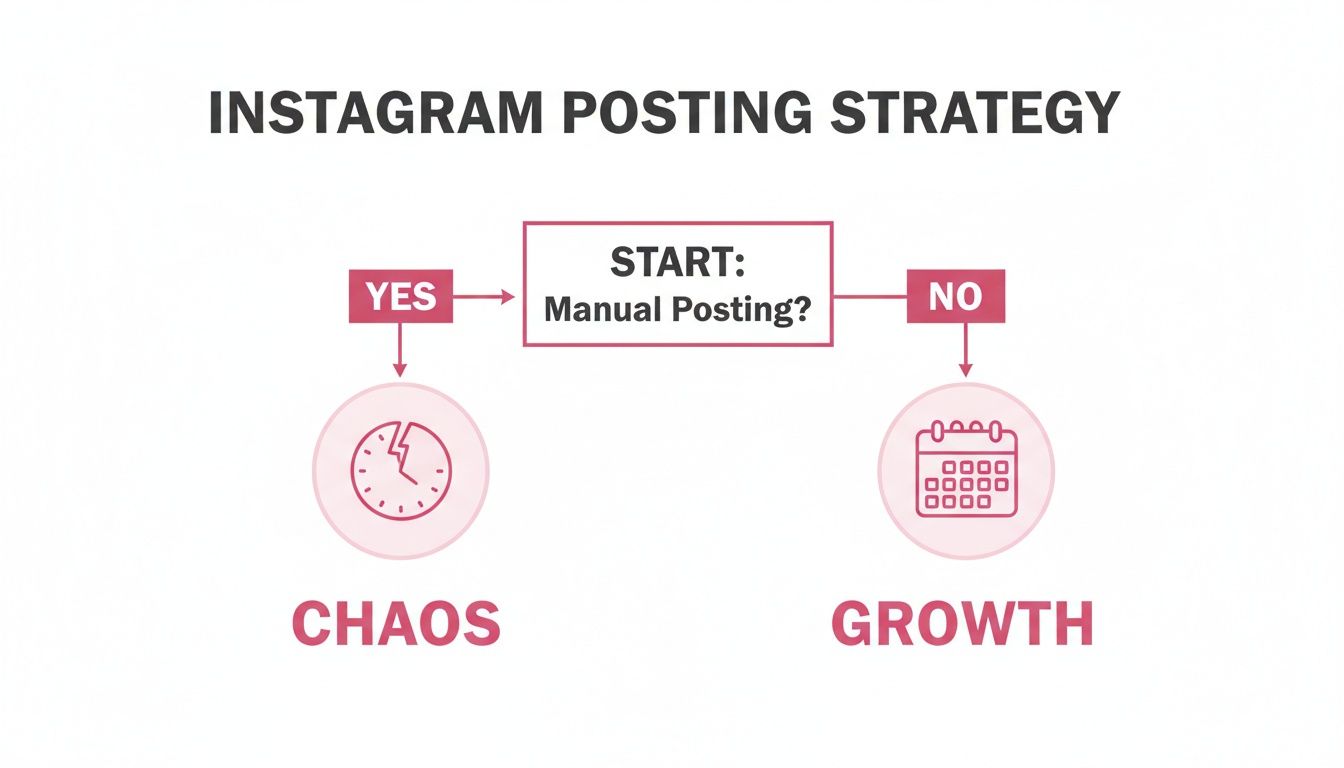
As you can see, the first real step toward a less stressful workflow is simply deciding to move away from posting on the fly.
The In-App Native Scheduler
Instagram's own built-in scheduler is the most direct way to get started. If you have a professional account (either Business or Creator), you can schedule posts and Reels right from the app's advanced settings. It's perfect for individuals who just want to plan content a few days ahead without signing up for another platform.
But its simplicity comes with limitations. You can only schedule content up to 75 days out, and you're capped at 25 posts per day. It's a fantastic starting point for basic consistency, but you'll quickly outgrow it if you're trying to scale a business.
The Free Power Of Meta Business Suite
For anyone managing both an Instagram and a Facebook presence, Meta Business Suite is the logical next step up. It's a completely free and surprisingly robust tool that pulls all your planning into a single dashboard. From your desktop, you can schedule posts, Reels, and even Stories across both platforms.
This is a huge upgrade from the in-app scheduler. It gives you a much better visual content planner and even lets you tweak captions for each platform when you're cross-posting. For small businesses and marketers who need more organization without a budget, Meta Business Suite handles all the fundamentals really well.
Advanced Third-Party Scheduling Platforms
Once your Instagram strategy becomes a core part of your business, third-party tools are no longer a "nice-to-have"—they're essential. Platforms like happydms go way beyond just scheduling. Think of them as complete marketing hubs built for efficiency and growth.
These tools are designed for teams and agencies that need more firepower:
Deep Analytics: Track post performance, follower growth, and engagement trends with way more detail than the native insights offer.
Team Collaboration: Set up workflows where multiple users can draft, approve, and schedule content with specific roles and permissions.
Automation Workflows: This is a game-changer. You can set up auto-replies to comments or DMs, which directly connects your scheduled content to lead generation and customer service. Our course on Instagram automation dives deep into these strategies.
Integrated CRM: Many of these platforms will sync follower interactions into a customer relationship management system, turning your audience into actionable leads.
For an e-commerce brand, a third-party tool means you can schedule a product launch post and, at the same time, set up an auto-DM to answer all the "How much?" comments that will flood in. That's when scheduling becomes a revenue-generating activity.
To really get the most out of your workflow, it's worth exploring the landscape of essential social media content management tools that can centralize all your efforts.
Instagram Scheduling Method Comparison
Here's a quick comparison to help you choose the right tool based on your needs, from solo creators to large marketing teams.
| Feature | Instagram App (Native) | Meta Business Suite | Third-Party Tools (e.g., happydms) |
|---|---|---|---|
| Cost | Free | Free | Paid (Varies by plan) |
| Platforms | Instagram Only | Instagram & Facebook | Multiple (Instagram, Facebook, TikTok, etc.) |
| Best For | Individuals & Beginners | Small Businesses & Marketers | Agencies, Teams & E-commerce |
| Key Features | Basic Post/Reel scheduling | Cross-platform scheduling, Content planner | Advanced analytics, Team workflows, Automation |
| Limitations | No Stories, Limited analytics | Basic features only, No advanced automation | Requires a subscription fee |
Ultimately, the right tool for you today might not be the right one in six months. The key is to assess your current needs—are you just trying to be consistent, or are you running complex business operations?
Start with the tool that solves your immediate problems, and don't be afraid to upgrade as your brand's ambitions grow.
A Practical Walkthrough of Native Instagram Scheduling
Before you even think about paying for a third-party tool, you need to get your hands dirty with what Instagram gives you for free. Meta actually provides some pretty solid, built-in options that are perfect for getting your scheduling sea legs.
Mastering these native tools gives you a solid foundation for any content strategy. So, let's walk through exactly how to schedule posts using what you already have—both inside the Instagram app and through the more powerful Meta Business Suite.
Scheduling Directly Within the Instagram App
The quickest way to get started is right from your phone. Instagram baked a scheduling feature directly into the app, and it's a lifesaver for planning content on the fly. This option is available for any Professional account, whether it's set to Business or Creator.
The process is designed to feel completely natural, fitting right into your normal posting routine. You'll create a new post or Reel just like you always do—upload your photo or video, nail the caption, and add your hashtags.
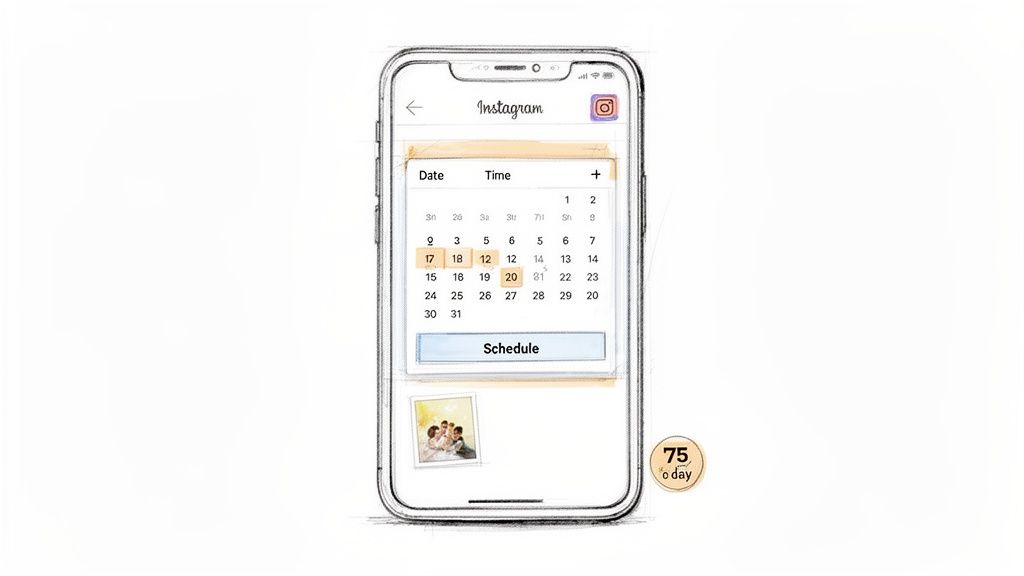
But here's the key difference: before you hit that final share button, scroll to the bottom of the screen and tap on Advanced Settings. Inside, you'll find a toggle for Schedule this post. Flip that on, and you can pick the exact date and time you want your content to drop.
You can queue up content for a specific day and time right from a simple calendar view. Once you've picked your slot, just tap back and hit the "Schedule" button where "Share" would normally be. Easy.
This feature was a huge deal when it finally rolled out in late 2022. It gave creators the power to schedule up to 25 posts per day and plan content up to 75 days ahead. For anyone trying to manage a content calendar without burning out, it was a game-changer. You can dig deeper into the evolution of Instagram's scheduling features on sproutsocial.com.
Using Meta Business Suite for More Control
The in-app scheduler is fantastic for its convenience, but when you need to get more serious about planning, Meta Business Suite is where you should be. It's a free, desktop-friendly dashboard that gives you a bird's-eye view of both your Instagram and Facebook presence.
Once you're in the Business Suite and have your accounts connected, you can really start to organize your workflow. Here's what you can do:
Schedule Everything: Unlike the app, the Business Suite lets you schedule Posts, Stories, and Reels.
See Your Whole Calendar: The "Planner" view lays out your entire month or week visually, showing all your scheduled and published content in one spot.
Tweak for Each Platform: When you're posting to both Instagram and Facebook, you can customize the caption for each. This is crucial for avoiding that lazy, copy-paste look.
Honestly, using Meta Business Suite feels less like a quick scheduling hack and more like proper content management. When you can see your entire week laid out, you can instantly spot content gaps and make sure your feed feels balanced.
Key Limitations to Keep in Mind
As great as these free tools are, they have their limits. Knowing what they can't do is just as important, as it helps you decide when it's time to upgrade to a more specialized third-party tool.
75-Day Scheduling Window: You can only plan up to 75 days out. While that's fine for most, brands mapping out long-term evergreen campaigns might find it restrictive.
No First Comment Scheduling: A common tactic to keep captions clean is scheduling your hashtags to post in the first comment. You can't do this with Meta's tools.
Basic Analytics: You'll get the standard performance numbers, but the analytics in Business Suite aren't nearly as deep or customizable as what you'd find in a dedicated social media platform.
No Advanced Automation: These are publishing tools, plain and simple. They don't offer features like automatically replying to comments or sending DMs based on triggers from your scheduled posts.
By starting with these free methods, you'll build a consistent posting habit and get a real sense of your own workflow. The moment you start feeling constrained by these limitations, you'll know exactly what to look for in a more advanced solution.
Take Your Scheduling to the Next Level with Advanced Automation
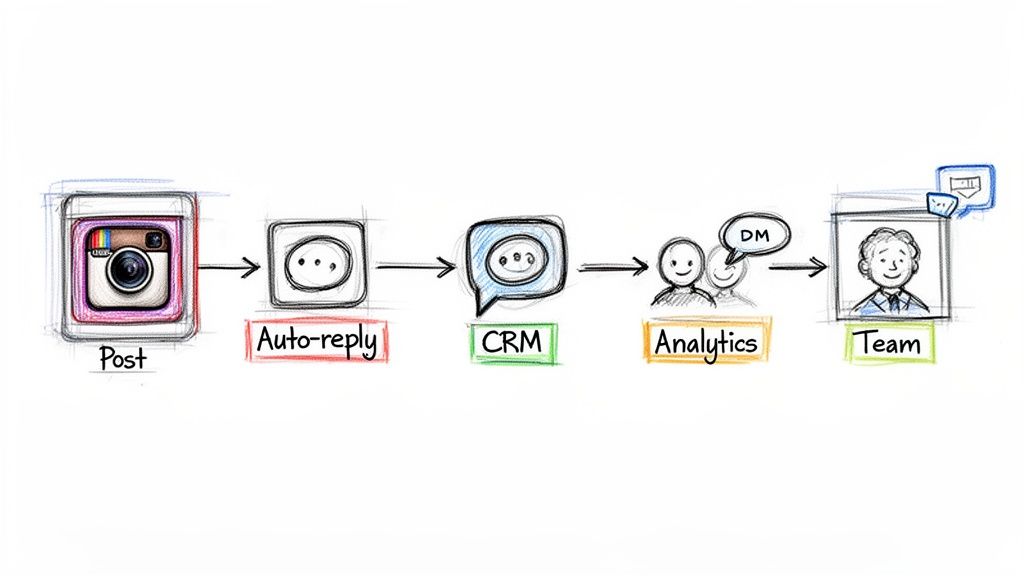
While Instagram's built-in tools are a great starting point, real growth kicks in when scheduling becomes just one piece of a much bigger marketing machine. This is where third-party platforms completely change the game. They turn the simple act of scheduling a post into a powerful engine for engagement, lead generation, and sales.
Think of it like this: native scheduling is like setting a basic reminder on your phone. A powerful third-party tool is like having a fully automated personal assistant who not only posts on time but also chats with your audience, sorts new leads, and brings you a detailed report card afterward.
These tools are built to handle the chaos of a growing brand, where every single post is a chance to spark a conversation, capture a lead, or solve a problem—often without you lifting a finger.
Go Beyond a Simple Schedule and Build Engagement Funnels
The biggest leap you'll make with third-party tools is connecting your scheduled posts directly to automated engagement. You're no longer just broadcasting content; you're building a two-way, interactive experience that nurtures your audience 24/7.
Let's say an e-commerce brand schedules a post announcing a new product. The second it goes live, the comments roll in: "How much?" "Ship to the UK?" "What other colors?" Trying to reply to every single one manually is a recipe for disaster.
With a smart scheduler, you can set up the rules before you post.
Keyword Triggers: Automatically reply to comments with words like "price" or "cost," politely telling the user to check their DMs for the info.
Instant DM Follow-ups: At the same time, send a direct message with a link to the product, a special discount code, and answers to other common questions.
Suddenly, your scheduled post is an instant sales funnel. The content grabs their attention, their comment signals interest, and the automated DM closes the loop by giving them exactly what they need to buy.
When you link scheduled content to automated replies, you create a seamless customer journey that feels personal and lightning-fast. You capture leads at the peak of their interest—even if you're asleep when the post goes live.
Streamline Your Team's Workflow
For agencies and marketing teams juggling multiple accounts, things can get messy fast. Third-party tools are designed for collaboration, creating a clean, organized, and secure workflow for everyone on the team.
Forget about sharing passwords in a spreadsheet or approving content through endless email chains. A proper platform gives you a central command center where your team can work together without tripping over each other.
Must-Have Collaboration Features:
Custom User Roles: Assign specific permissions like "Content Creator," "Editor," or "Client Approver." This means a junior team member can draft posts, but only a manager can hit the final "schedule" button.
Shared Content Calendars: The whole team sees the entire content plan in one place. No more confusion about what's going live and when.
Approval Queues: Content can be submitted for review, letting managers and clients provide feedback before anything gets scheduled. This is a lifesaver for maintaining brand consistency.
This kind of structured environment is absolutely critical for scaling up. It lets you onboard new people, manage client accounts securely, and keep your quality high across the board.
Unlock Deeper Analytics and Follower Insights
Instagram's native Insights are fine, but third-party tools give you a much more granular look at your performance. They tie analytics directly to your scheduled posts, so you can see exactly how your planned content is moving the needle on your growth goals.
Many of these platforms even include a built-in Customer Relationship Management (CRM) system. Every time someone engages with a scheduled post or sends a DM, the interaction is logged on their contact profile. Over time, this builds a rich history for each follower, helping you pinpoint your most engaged fans, track customer issues, and even segment your audience for targeted campaigns.
This fusion of scheduling, engagement, and data is what makes these tools so powerful. You're not just figuring out how to schedule Instagram posts; you're building a data-driven system that turns followers into loyal customers. For a closer look at how these workflows operate, our guide on how to automatically DM someone who comments on an Instagram post is the perfect next step.
How to Find Your Audience's Prime Time for Posting
Knowing how to schedule Instagram posts is a huge first step, but the real magic happens when your content goes live at the exact moment your audience is actually scrolling. Posting into a void is just a waste of perfectly good content. Your goal is to post when your community is most active to drive that crucial initial engagement the algorithm absolutely loves.
You can forget the generic advice you've read a dozen times. Sure, industry benchmarks can be a decent starting point, but your audience is unique. The best, most reliable data for your brand comes directly from your own Instagram Insights.
Tapping Into Your Instagram Insights
To find your personalized peak times, you'll need an Instagram Business or Creator account. If you've got that set up, just head to your profile, tap on "Professional Dashboard," and then find your way to "Total Followers."
Scroll down to the bottom, and you'll hit the "Most Active Times" section. This is your goldmine. Instagram breaks down your audience's activity by both hours and days, giving you a visual heatmap of when your followers are online.
Hourly Breakdown: This shows you which hours of the day see the most activity. You're looking for consistent spikes—maybe it's during the morning commute (7-9 AM) or that evening wind-down (8-10 PM).
Daily Breakdown: This reveals the most popular days of the week. You might discover your audience is all-in on weekends but completely tunes out on Mondays.
Use this data to build a working hypothesis. If Wednesday at 8 PM looks like a hotspot, schedule your most important posts for that window and see what happens.
Don't just look at the highest peak and call it a day. I've found that testing the shoulder times can be surprisingly effective. Sometimes, posting just before a major activity spike helps your content get noticed before everyone else's floods the feed.
Understanding Quality Over Sheer Quantity
Once you've figured out when to post, the next logical question is how often. The algorithm doesn't reward brands for spamming their followers' feeds. What it really prioritizes is predictable, high-quality content that consistently earns engagement. This is where a solid scheduling routine becomes essential for any kind of sustained growth.
Today's algorithm relies heavily on AI to curate feeds, predicting what users will interact with and favoring creators who post consistently over those who just post a lot. Current data shows that posting 3-5 high-quality feed posts per week is often the sweet spot for maximizing reach without burning out your audience or your content team. Interestingly, for brands that can maintain quality, bumping that up to 6-10 posts per week can nearly double results, while 11 or more can triple engagement per post. You can dig deeper into these posting frequency findings from Hopper HQ.
Establishing a Realistic Posting Cadence
Finding your ideal frequency is all about striking a balance. It's a mix of what your analytics suggest and what your team can realistically produce without hitting a wall. Trust me, a sustainable schedule is always better than an ambitious one that falls apart in a month.
Here are some practical benchmarks to start with:
Feed Posts: 3-5 times per week
Reels: 4-7 times per week (especially if video is your strong suit)
Stories: 5-10 times per week (using a mix of polls, Q&As, and links)
This kind of rhythm trains your audience to expect fresh content from you. It also signals to the algorithm that you're a reliable creator worth promoting. Once you've identified these patterns, you can use a free Instagram account monitor to track how your new schedule impacts follower growth and engagement over time. Start with your Insights data, test your timing, and keep tweaking until you find that perfect cadence for your brand.
Building a Sustainable Content Calendar and Workflow
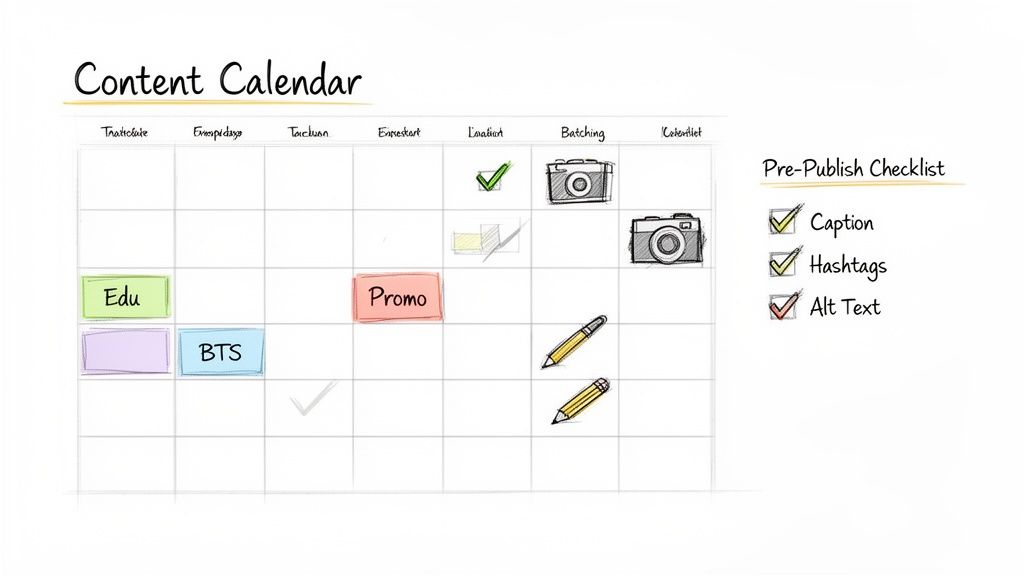
Let's be honest: a great scheduling tool is only as good as the strategy behind it. If you don't have a solid plan, you're just scheduling chaos in advance. This is where a sustainable content calendar and a smart workflow come in—it's what turns your Instagram from a daily grind into a powerful, brand-building machine.
The first move is to ditch the random acts of content. Instead, figure out your core content pillars. These are the 3-5 main themes you'll talk about over and over again. For a fitness coach, that might look like 'Workout Tutorials,' 'Nutrition Tips,' 'Client Transformations,' and 'Mindset Motivation.'
Having pillars like these ensures you're always serving up a healthy mix of content that hits different audience needs. It keeps your feed fresh and stops you from sounding like a broken record. For a deeper dive into organizing your posts, check out this practical guide on how to create a content calendar that truly works for you.
Master the Art of Content Batching
Once your pillars are locked in, the single most effective way to fill that calendar is with content batching. This isn't some complicated industry secret. It just means dedicating specific chunks of time to one type of task, which is a massive productivity booster that keeps you in a creative flow state.
Stop trying to shoot, edit, and write for a single post all in one go. Instead, break it all down. You could spend one afternoon filming all your Reels for the next week. Then, the next day, you can put on your writer's hat and focus only on cranking out killer captions for everything you've scheduled.
Batching isn't just about saving time; it's about protecting your creative energy. When you separate the "doing" tasks (like filming) from the "thinking" tasks (like writing), you produce much higher-quality content with way less mental burnout.
Your Essential Pre-Publishing Checklist
Okay, so your content is created and batched. The final piece of the puzzle is a non-negotiable pre-publishing checklist. This little safety net makes sure every post you schedule is fully optimized for success before it ever sees the light of day. It's what prevents those silly, avoidable mistakes.
Before you dare hit that "schedule" button, run through these key items:
Compelling Caption Crafted: Does your caption actually grab attention? Does it provide value and have a clear call-to-action?
Strategic Hashtags Researched: Have you pulled together a smart mix of broad, niche, and branded hashtags that are actually relevant?
Effective Alt Text Written: Is your alt text descriptive? This helps both visually impaired users and the Instagram algorithm figure out what your image is about.
Accounts and Locations Tagged: Did you remember to tag any collaborators, brands, or the location to stretch your post's reach?
Making this checklist a mandatory part of your workflow ensures every single post is polished and primed to perform. If you want to streamline this even more, you can grab some helpful layouts and checklists from our collection of Instagram content templates.
Common Questions About Scheduling Instagram Posts
If you're just dipping your toes into scheduling Instagram content, a few questions are bound to pop up. Let's tackle some of the most common myths I hear so you can plan your posts with total confidence.
Does Scheduling Posts Hurt Your Engagement?
Nope, not at all. This is probably the biggest myth out there, and it's time we put it to rest.
When you use an official, authorized tool to schedule your posts, Instagram's algorithm sees it exactly the same as if you posted it yourself in that moment. What really matters for engagement is the quality of your content and whether you post when your audience is actually online and scrolling. Honestly, scheduling often helps your engagement because it ensures you're consistently hitting those peak times, even if you're busy with something else.
Can You Schedule Both Instagram Stories and Reels?
Yes, absolutely. Gone are the days when you could only schedule simple feed posts.
Today's tools, from Meta Business Suite to the top third-party schedulers, let you line up your Reels, Stories, carousels, and single-image posts. This is a game-changer because it means you can map out a truly diverse content calendar in advance, mixing up your formats without the last-minute scramble.
The bottom line is this: scheduling is just the delivery method. The algorithm cares what you post and when you post it, not how it got there.
What Is the Best Free Instagram Scheduling Tool?
If you're looking for a powerful free option, Meta Business Suite is your best bet. It's built right into the ecosystem, connecting your Instagram and Facebook accounts so you can schedule posts, Stories, and Reels from one central dashboard.
It might not have all the bells and whistles of a paid tool—like deep analytics or advanced automation—but for anyone just starting out, it's a fantastic and reliable platform.
Ready to take things a step further? With happydms, you can connect your scheduled posts to a full growth engine, complete with auto-replies, a built-in CRM, and team collaboration tools. Start turning your followers into real customers today at https://happydms.com.