
How to Manage Multiple Instagram Accounts and Scale Your Business
Let's be honest, trying to manage more than one Instagram account feels a lot like juggling flaming torches. You've got your personal brand, a client's e-commerce store, and maybe a new agency profile you're trying to get off the ground.
The reality is a frantic dance of logging in and out, a constant low-grade panic that you're about to post a weekend selfie to your client's feed, and a notification nightmare that never ends. This isn't just annoying—it's a genuine business risk that kills productivity and opens the door to costly mistakes.
From Chaos to Control
The daily struggle is real. You're probably tracking DMs in one browser tab, checking comments on your phone, and grabbing content from a shared drive, all while praying you've selected the right profile pic in the corner. This fractured approach simply doesn't scale and cripples your ability to actually connect with your audience.
The fix isn't just about finding a more convenient workflow; it's about making a strategic shift to a centralized system.
This is where a dedicated platform like happydms
The biggest hidden cost of managing accounts manually is context switching. Every single time you log out of one account and into another, you lose your focus and dramatically increase the odds of making a mistake. A unified dashboard gets rid of that friction completely.
Why Centralization Is No Longer Optional
With Instagram now home to around 2.5 billion monthly active users and over 80% of users following at least one business, being able to manage multiple accounts effectively isn't a luxury—it's a necessity.
This insane growth is exactly why specialized tools are so critical. Without them, managers are fighting a losing battle. The infamous 'wrong account' blunder happens in up to 40% of manual multi-account workflows, a direct result of the constant login shuffle. It's a surprisingly common and embarrassing error that a centralized system prevents. You can read more about the challenges of multi-account posting here
To really see the difference, let's break down the daily grind of managing multiple accounts the old way versus using a proper tool.
Manual Management vs Centralized Platform
Here's a quick comparison of the daily realities of managing Instagram accounts manually versus using a tool like happydms.
| Task | Manual Method (The Struggle) | Centralized Platform (The Solution) |
|---|---|---|
| Switching Accounts | Constantly logging in and out, risking errors and lockouts. | Seamlessly toggle between accounts in a single dashboard. |
| Team Access | Sharing sensitive passwords, no control over permissions. | Assign secure, role-based access to team members. |
| Content Posting | Uploading content individually to each account, one by one. | Schedule and publish content to multiple accounts at once. |
| Replying to DMs | Juggling multiple inboxes, losing track of conversations. | A single, unified inbox for all DMs across all accounts. |
| Monitoring | Manually checking each account for comments and mentions. | Real-time notifications for all accounts in one feed. |
| Reporting | Pulling analytics from each profile and compiling them by hand. | Consolidated reports showing performance across all accounts. |
As you can see, the contrast is stark. One path leads to burnout and mistakes, while the other creates an efficient, scalable, and far less stressful system for growth.
Building a Secure Foundation for Your Accounts
Before you can even think about streamlining workflows or automating a single reply, you have to build a solid, secure foundation. Managing multiple Instagram accounts the right way starts with getting them out of the personal-account sandbox and into a professional framework. This isn't just a friendly suggestion; it's a non-negotiable step for any serious brand, creator, or agency.
The first move? Convert every single profile you manage into either an Instagram Business or Creator account. It's a simple switch you can make in the account settings, and it's what unlocks access to the Meta Business Suite and the essential API connections that tools like happydms
Once your accounts are professional, it's time to bring them all under one roof. Instead of juggling them inside the native app, you'll connect each one to a central hub like happydms. This process authenticates your ownership securely through Meta, creating a single command center for everything.
This flow chart really nails the journey from scattered, chaotic efforts to a streamlined system built for growth.
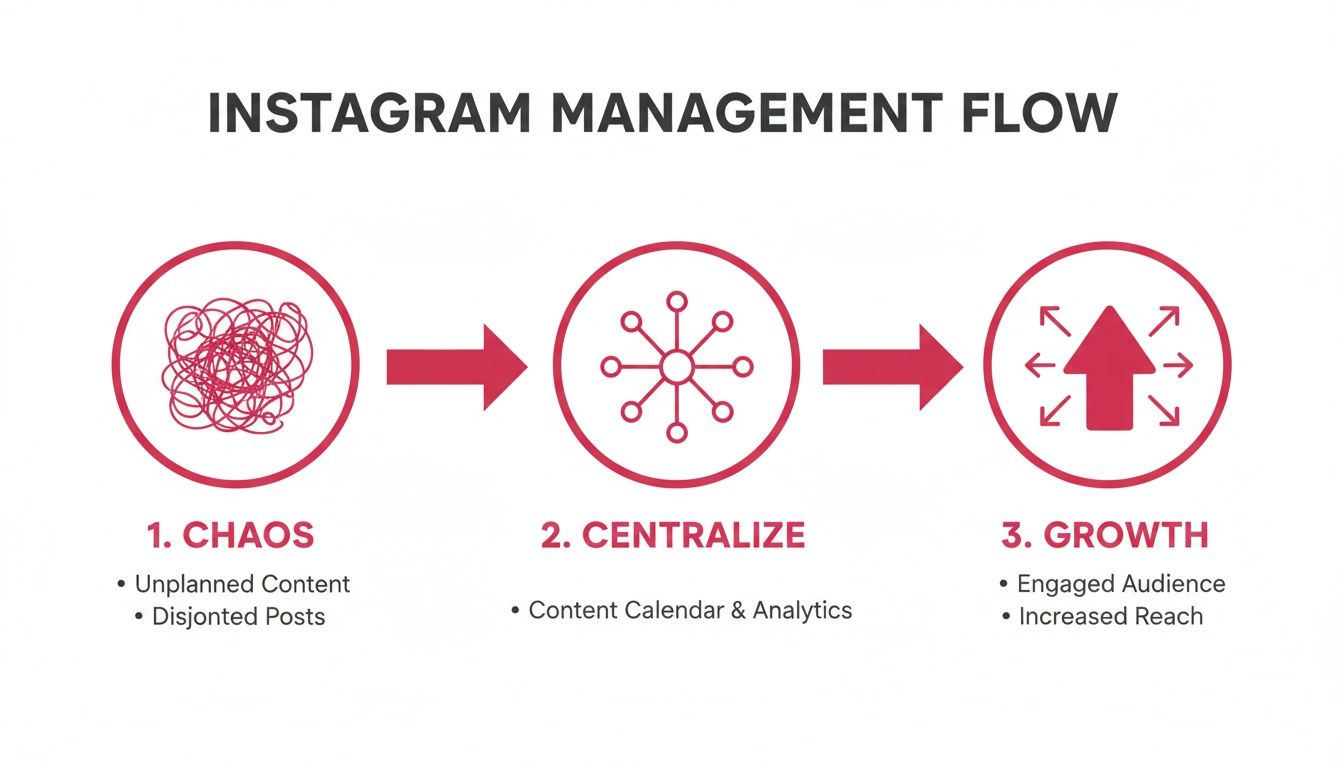
The real takeaway here is that you can't get to true, scalable growth until you've established a centralized and secure system for managing all your accounts.
Moving Beyond Shared Passwords
That old method of passing around usernames and passwords in a spreadsheet? It's not just clunky; it's a massive security liability. It creates unnecessary risk, makes it impossible to track who did what, and frankly, it often breaches client trust.
The modern solution is to manage access through roles and permissions. This is where a dedicated platform becomes absolutely essential. Instead of handing someone the keys to the entire kingdom, you grant them specific, revocable access based on their job.
The moment you stop sharing passwords is the moment you start operating like a professional. Role-based access control isn't just a feature; it's a fundamental shift in how you protect your brand and client assets.
This approach means no one ever needs to log in directly, which is a game-changer as security expectations have gotten tougher. In fact, security breaches have been shown to rise by 300% for teams sharing passwords across five or more accounts. A significant 70% of clients now refuse to provide direct login details, and for good reason.
Ever since Instagram's API updates back in 2019, the whole industry has shifted toward permission-based systems. By 2023, 80% of enterprises using role-based access reported zero unauthorized posts—a huge improvement from the 25% error rates common with manual setups. You can dig into more Instagram security and usage statistics to see just how deep these trends run.
Assigning Roles and Permissions in Practice
Let's get practical. Imagine you run a marketing agency and just brought on a new e-commerce client. Your team has a content scheduler, a community manager, and an analyst. Here's how you'd use a platform like happydms to give everyone secure access without sharing a single password:
Content Scheduler: This person needs access to the content calendar and scheduling tools for the new client. You can give them permission to draft, schedule, and publish posts and Reels, but completely block their access to the account's DMs and analytics.
Community Manager: Their job is all about audience engagement. You'd grant them full access to the unified inbox to reply to DMs and comments for that specific client, but they wouldn't be able to schedule content or touch the analytics.
Analyst: This team member just needs to track performance and pull reports. You can give them view-only access to the analytics dashboard for that account. They can see all the data they need without being able to post content or talk to the community.
This level of granular control means every team member has exactly the access they need to do their job—and nothing more. If someone leaves the team, you just revoke their access from the central dashboard with one click. All connected accounts are instantly secured, no frantic password-changing required.
Scaling Your Presence with Smart Automation
Alright, once your accounts are linked up and your team knows who has the keys, it's time to talk scale. Let's be real: manually replying to every single comment, DM, and story mention is a one-way ticket to burnout, especially when you're juggling multiple profiles. This is the point where you have to move from just managing your accounts to making them work for you with smart automation.
This isn't about turning your brand into a robot. It's the exact opposite. Automation is about clearing out the repetitive noise—all those "price?" comments and basic FAQs—so you can jump into the conversations that actually build relationships. It lets you build intelligent systems that give people instant answers and nurture leads 24/7.
You're essentially making sure no potential customer is left hanging. That's a huge deal when studies show that getting back to a lead within the first hour can massively boost your chances of making a sale.
Building Your First Automated Workflows
The secret to good automation is to start simple. What are the questions you get asked a thousand times a day? For most brands, it's usually about pricing, where to buy, or links to specific products.
Using a tool like happydms
Here are a few foundational automations you can build right now:
Keyword-Based Comment Replies: Set up a rule that listens for words like "price" or "how much" in your comments. When it spots one, it can automatically shoot that person a DM with a link to your shop or pricing page. Simple, effective.
Welcome DMs for New Followers: Greet every new follower with a warm, personalized message. This is your shot to make a great first impression, maybe offer a small discount, or point them toward your best stuff.
Story Mention Auto-Responders: When someone shouts you out in their Story, send an automatic thank-you message. It's a small touch, but this kind of instant acknowledgment can turn a casual fan into a serious advocate for your brand.
The real goal of automation is to build a machine that works for you even when you're not online. A well-built workflow doesn't just save you hours—it creates a consistently awesome experience for your audience, no matter how big you get.
A Real-World Automation Scenario
Let's look at a course creator juggling three different Instagram accounts: one for her personal brand, a second for a beginner's marketing course, and a third for an advanced SEO masterclass. Trying to handle all the DMs and comments manually would be a full-time job in itself.
With happydms, she can design a unique, automated funnel for each account:
On her Personal Brand Account, she sets up a simple welcome DM for new followers. It just thanks them for connecting and links to her latest blog post. It's all about nurturing that personal connection, not selling hard.
For the Beginner's Course Account, the workflow is more direct. It's programmed to catch comments with words like "link," "info," or "enroll." When triggered, it instantly DMs the user a link to the course sales page and answers a few FAQs.
The Advanced Masterclass Account has the most sophisticated setup. It auto-replies to specific questions about the curriculum. But it also sends a follow-up DM 24 hours later to anyone who got the info but didn't click the link, offering them a free preview lesson to nudge them along.
This kind of layered approach makes sure every single lead gets the right information at the right time, guiding them through the sales process without the creator lifting a finger. It's a perfect example of effective workflow marketing automation
And as you scale, managing these systems can become a task in itself. That's when bringing in an Instagram virtual assistant
Nail Down Your Content Workflow Across Every Account
Once you have all your accounts securely linked and accessible, the real fun begins: managing the actual content. This is where the day-to-day grind of juggling multiple Instagram profiles can either become a chaotic mess or a well-oiled machine. Without a solid system, you're setting yourself up for missed posts, brand voice mix-ups, and content that just doesn't land.
An efficient content pipeline is your secret weapon. It transforms that frantic, last-minute scramble for something—anything—to post into a calm, strategic operation. The goal here is to get out of reactive mode ("What are we posting today?!") and into a proactive rhythm where your content is planned out weeks, or even months, ahead.
Build a Unique Content Calendar for Each Brand
This is probably the biggest mistake I see people make. They treat all their accounts like they're the same, pushing out similar content across the board. A post that kills it for a B2B tech brand will get you nothing but crickets on an account for a DTC fashion label. Every single profile has its own audience with its own expectations, and your content has to reflect that.
That's why separate, dedicated content calendars for each account are completely non-negotiable. It forces you to get strategic and give each profile the individual attention it deserves.
Brand A (a fitness coach): Their calendar would be packed with workout tip Reels, client testimonial Stories, and motivational quotes for the main feed. The vibe is all about aspiration and high energy.
Brand B (a local coffee shop): This calendar, on the other hand, should focus on gorgeous photos of new drinks, behind-the-scenes Stories with the baristas, and reposting user-generated content from happy customers. The tone is cozy, local, and community-driven.
By keeping these calendars distinct, you prevent your content from getting stale and ensure each brand's voice comes through loud and clear. If you're new to this, learning the principles of creating a comprehensive content calendar
The Sanity-Saving Power of Bulk Scheduling
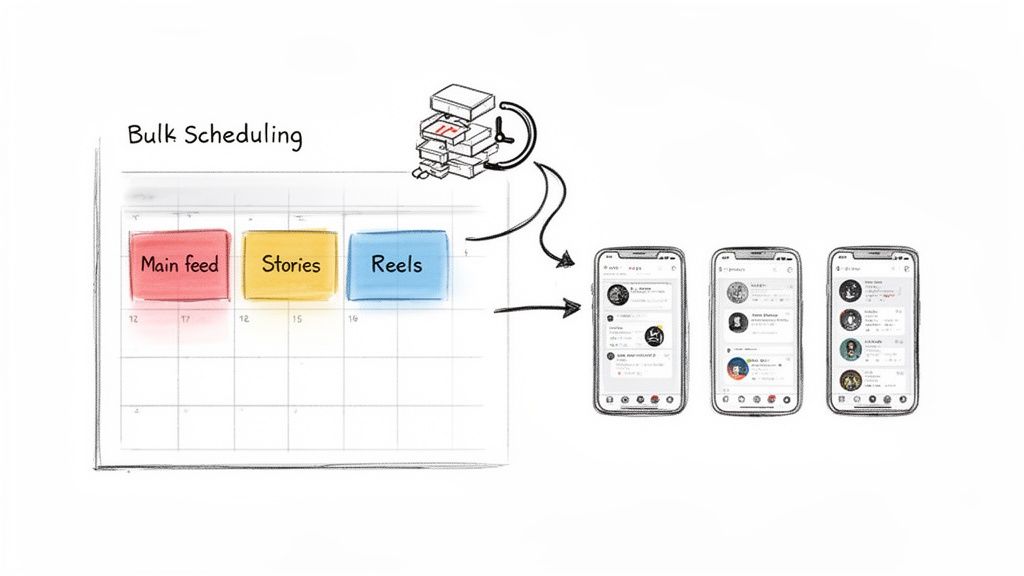
With your calendars mapped out, the next step is making the execution just as efficient. This is where bulk scheduling from a single dashboard becomes an absolute game-changer. Instead of the soul-crushing task of logging in and out to manually upload every post, Story, and Reel, you can block off a couple of hours and get everything scheduled for the entire week or month.
This approach doesn't just save you a little time—it saves you a ton of time. Constantly switching between platforms can eat up nearly 50% of your daily workflow and is a direct cause of delays in 30% of posting schedules. Even worse, one study found that 65% of social media managers juggling five or more accounts miss out on crucial engagement windows—like replying in that first hour when conversions can get a 25% lift.
The real magic of bulk scheduling isn't just about saving time; it's about buying back your mental energy. When you know your content is locked, loaded, and running on autopilot, you can finally stop stressing about admin tasks and start focusing on high-impact work like community engagement and big-picture strategy.
A Real-World Multi-Brand Scheduling Scenario
Let's imagine you're running social for a DTC brand with three distinct Instagram accounts:
Main Brand Account: The polished, official home for product launches, campaign imagery, and brand announcements.
Behind-the-Scenes (BTS) Account: A more raw, unedited look at office culture, employee spotlights, and the making-of process.
Ambassador Account: A feed dedicated entirely to showcasing user-generated content (UGC) and influencer collaborations.
Using a tool like happydms, a social media manager can orchestrate this whole ecosystem from one command center. On a Monday morning, they can sit down and schedule out the entire week's content for all three profiles in one go.
Main Account: A carousel post announcing a new product is scheduled for Tuesday at 10 AM. A high-energy Reel showing the product in action is set for Thursday at 1 PM.
BTS Account: A quick, candid Story of the team packing orders is lined up for Wednesday afternoon. An "Ask Me Anything" session with the founder is planned for Friday.
Ambassador Account: Three different UGC posts from happy customers are scheduled to go live on Monday, Wednesday, and Friday, keeping the feed fresh and community-focused.
All of this gets planned, approved, and scheduled in a single session without ever needing to log out and back in. This is how you manage multiple accounts without burning out. To get started on your own, check out our in-depth guide to building your content calendar for Instagram
Turning Audience Data into Actionable Insights
Managing multiple Instagram accounts successfully is about more than just lining up posts and answering comments. The real magic happens when you stop seeing audience interactions as scattered data points and start seeing them as a single, unified picture of who your followers are and what they actually care about.
This is the pivot point from basic social media management to real marketing intelligence.
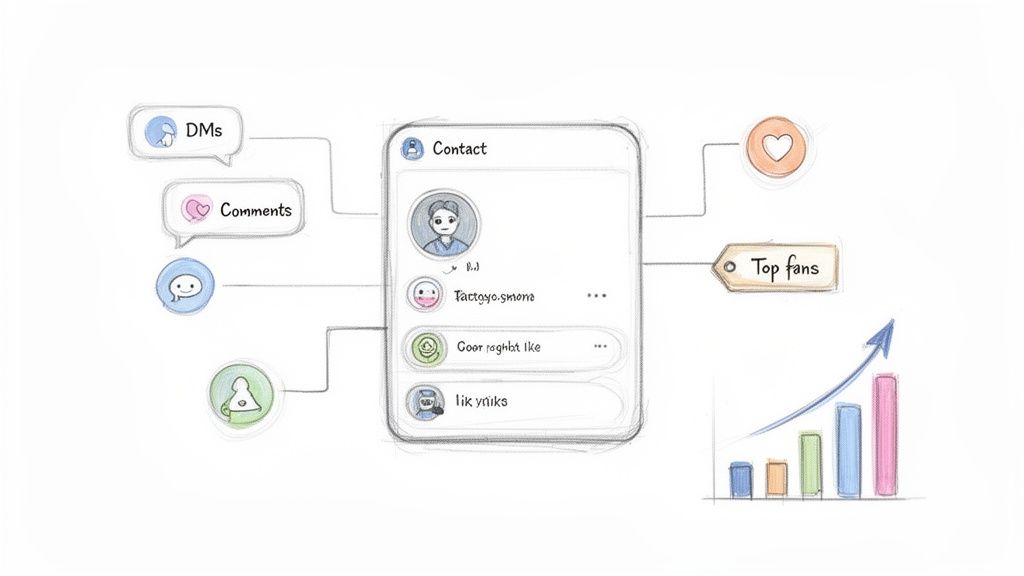
The trick is to break free from the siloed thinking that separate inboxes and follower lists create. This is precisely what a unified CRM, built right into a platform like happydms
Suddenly, you have a complete, 360-degree view of your audience. You can finally see a follower's entire journey across all your brand touchpoints, pinpoint your most engaged fans, and understand their behavior on a much, much deeper level.
From Simple Followers to Segmented Audiences
Once all your audience data lives in one place, you can get to the fun part: segmenting your followers based on their actual behavior. This is miles more powerful than just looking at follower counts. You can build dynamic lists of people who meet specific criteria, which opens the door for incredibly targeted communication.
Instead of shouting the same message at everyone, you can tailor your outreach with surgical precision. This is a game-changer for anyone figuring out how to manage multiple Instagram accounts for maximum impact.
Here are just a few examples of powerful segments you could build:
Top Fans: Create a list of users who have commented on more than five posts across any of your accounts in the last month.
Story Responders: Segment followers who frequently reply to your Stories, flagging them as highly engaged and conversational.
Recent Inquirers: Group together anyone who has sent a DM asking about pricing or product details in the past 30 days.
A unified view of your audience is the difference between shouting into a crowd and having a meaningful one-on-one conversation. When you know who your most loyal followers are, you can reward them, learn from them, and turn them into powerful brand advocates.
Putting Segmentation into Action: A Real-World Scenario
Let's imagine an influencer who runs her personal brand account and a separate profile for her merchandise line. On the surface, these two audiences seem totally separate. But with a unified CRM, she can see the crucial, money-making overlap between them.
Using happydms, she creates a segment of followers who have engaged with her personal brand account at least ten times in the past month and also follow her merchandise account. This isolates her most dedicated, high-intent fans—the people most likely to buy because they're invested in her, not just a product.
Now, instead of a generic "new merch drop" post, she can get strategic. She uses the mass DM feature to send a personalized message exclusively to this hyper-targeted segment. Maybe it's an early access link or a special discount code as a thank you for their die-hard support.
The results are immediate and dramatic. Because the message only goes to her most loyal fans, the conversion rate is astronomically higher than a general post could ever hope to achieve. This is how you turn audience data directly into revenue. Building on this, you can learn more about how a chatbot for Instagram
Managing multiple Instagram accounts is more than just a content juggling act. The real test—the part that actually proves your strategy is working—is tracking performance. Without a solid handle on your analytics, you're just throwing content at the wall and hoping something sticks. You have no real way of knowing what's driving results and what's a complete waste of time.
Let's be honest, the old-school method is a nightmare. Logging into each account one by one, digging through native insights, and then manually dumping all that data into a massive spreadsheet? It's tedious, slow, and a recipe for mistakes. Good luck spotting any meaningful trends across your portfolio that way.
Ditching Spreadsheets for a Unified Dashboard
This is where a centralized analytics dashboard completely changes the game. Instead of the painful piece-by-piece data pull, a tool like happydms pulls all your key performance indicators (KPIs) from every single account into one clean, simple interface. In a single glance, you can see which accounts are popping off, what content is resonating, and when your audience is most active.
For agencies and brands, this unified view is a lifesaver. Picture this: you're in a client meeting and can instantly pull up a report showing their account's growth right next to their biggest competitor. It's powerful, provides instant context, and backs up your strategy with cold, hard data.
The point of multi-account reporting isn't just to collect a bunch of numbers. It's to find the story in the data. A unified dashboard lets you compare, contrast, and build a narrative that helps you make smarter decisions about where to focus your efforts.
Generating Consolidated Reports That Drive Strategy
A good analytics system lets you do more than just look at pretty graphs; it lets you generate consolidated reports that combine data from different profiles. This is how you start answering the big strategic questions that are simply impossible to tackle when you're looking at accounts in isolation.
For instance, you could build a report to:
Compare Follower Growth: See which accounts blew up last month and figure out what they did differently. Was it a viral Reel? A new content pillar?
Analyze Engagement Rates: Pinpoint the accounts with the best engagement and see if there's a pattern. Maybe carousels are crushing it on one account while Reels are the star on another.
Track Reach and Impressions: Identify which profiles are getting the most eyeballs and dig into why. Is it their hashtag strategy, their posting times, or something else entirely?
This level of insight is where you find the gold. An agency can use it to clearly demonstrate ROI. A brand manager can use it to figure out which brand voice is hitting the mark. By making this process quick and painless, you free up your time to actually act on the insights instead of getting buried in spreadsheets.
Curious how it feels? Check out our free Instagram account monitor
Key Metrics to Track Across Your Instagram Accounts
When you're managing several accounts, it's easy to get lost in vanity metrics. To stay focused, you need to track the KPIs that truly reflect performance and inform your strategy. This table breaks down what you should be watching and why it's so important in a multi-account context.
| Metric | What It Measures | Why It Matters for Multi-Account Management |
|---|---|---|
| Follower Growth Rate | The percentage increase in followers over a specific period. | Helps you identify which accounts are gaining traction the fastest and allows you to replicate successful growth tactics elsewhere. |
| Engagement Rate | The percentage of your audience that interacts (likes, comments, shares, saves) with your content. | Shows which content pillars and brand voices resonate most strongly, helping you allocate creative resources more effectively. |
| Reach & Impressions | Reach is the number of unique accounts that saw your post. Impressions are the total number of times your post was seen. | Comparing these across accounts reveals which ones have better visibility. It can highlight effective hashtag or content format strategies. |
| Website Clicks | The number of taps on the link in your bio. | A direct measure of how well your accounts are driving traffic to your desired destination. Essential for proving ROI. |
| Story Completion Rate | The percentage of viewers who watch your Stories from the first frame to the last. | Indicates how compelling your Story content is. A low rate on one account might signal a need for a creative refresh. |
| Top Performing Posts | The posts with the highest engagement, reach, or other key metrics. | Analyzing top posts across all accounts helps you identify universally successful content themes and formats. |
By consistently tracking these metrics in a unified dashboard, you can move from reactive management to proactive strategy. You'll know what's working, what's not, and exactly where to double down for the best results across your entire Instagram portfolio.
Bringing all your data under one roof turns reporting from a dreaded chore into your biggest strategic advantage. It's a non-negotiable step if you want to truly master how to manage multiple Instagram accounts effectively.
Got Questions About Managing Instagram Accounts?
Juggling multiple Instagram accounts often brings up a ton of questions about the rules and best practices. Getting the right answers is the key to building a system that's both efficient and secure. Let's break down some of the most common questions we hear from creators and brands.
Can I Manage Personal and Business Accounts Together?
You absolutely can. A central platform like happydms is designed to let you connect and switch between all your account types—personal, business, or creator—without any friction.
That said, for full access to the good stuff like automation and deep analytics, you'll want to convert your profiles to either an Instagram Business or Creator account. It's a simple process that just involves linking to a Meta Business Page, and it unlocks the API access that powerful tools need to work their magic.
What Is the Biggest Security Risk with Multiple Accounts?
Hands down, the single biggest risk is sharing login credentials among team members. It's a huge vulnerability just waiting to be exploited.
The pro move is to use a management tool that offers role-based permissions. This lets you grant specific access—say, to the inbox only—without ever handing over a password. It dramatically cuts down the risk of unauthorized access or someone accidentally messing something up.
The moment you stop emailing passwords and start assigning secure roles is the moment you elevate your operations from a risky side-hustle to a professional, scalable business.
How Many Instagram Accounts Can I Manage at Once?
The native Instagram app caps you at five accounts. For anyone serious about management, that's a clunky limitation that forces constant logging in and out.
A dedicated platform like happydms completely removes that ceiling. You can connect and manage a virtually unlimited number of accounts all from one clean dashboard. This makes it a no-brainer for agencies, social media managers, and larger brands.
Ready to stop the chaotic juggling act? happydms gives you the tools to automate DMs, schedule content, and see your entire audience in one place. Start for free and see how it works
Frequently Asked Questions
Have a question not in here? Contact us
- How do I securely manage multiple Instagram accounts?The most secure approach is to use a platform like happydms that offers role-based permissions instead of sharing passwords. Convert your accounts to Business or Creator profiles, then connect them through Meta's secure API. This eliminates the need to share login credentials while giving team members specific access levels based on their role.
- What's the best way to avoid posting to the wrong account?Use a centralized management platform that clearly displays which account you're posting to and allows you to schedule content in bulk. The 'wrong account' error happens in up to 40% of manual workflows due to constant switching. A unified dashboard eliminates this confusion entirely.
- Can I automate responses across multiple Instagram accounts?Yes! Set up automated workflows that trigger based on specific actions like new followers, keyword comments, or story mentions. These automations can work across all your connected accounts simultaneously, ensuring consistent engagement without manual effort.
- How do I track performance across multiple Instagram accounts?Use a unified analytics dashboard that pulls data from all your accounts into consolidated reports. Track key metrics like follower growth rate, engagement rate, reach, and website clicks. This allows you to compare performance and identify successful strategies to replicate across accounts.
- What's the difference between managing personal and business accounts?Business and Creator accounts unlock advanced features like analytics, scheduling APIs, and automation tools. While you can manage personal accounts alongside business ones, converting to Business or Creator accounts is recommended for full feature access and professional management capabilities.
- How many Instagram accounts can I manage simultaneously?The native Instagram app limits you to 5 accounts, but management platforms like happydms allow unlimited accounts. This makes them essential for agencies, social media managers, and brands with multiple profiles who need to scale beyond the native limitations.
- What are the biggest mistakes to avoid when managing multiple accounts?Avoid sharing passwords, posting the same content across different brand accounts, neglecting to create unique content calendars for each profile, and trying to manage everything manually. Also, don't forget to test your automation workflows before going live.
- How do I create separate content strategies for different accounts?Build unique content calendars for each account based on their specific audience and brand voice. A fitness coach's content strategy will differ completely from a coffee shop's approach. Use bulk scheduling to efficiently execute these separate strategies from a single dashboard.